Saturday, 8 February 2020

Hardwar remake -- Creating buildings

Just a quick update on the progress.

I've started making buildings and thinking through a modular way to make as many types of hangars with just a few basic parts. Here's some screenshots:


Hardwar remake - Giving a game the rebirth it deserves


The original starter moth - the humble Silver Y

I think I was 13 years old when I picked up a cheap looking PC game from a bargain bin in a One Price store. It cost me R30, which is about $2. It seemed to have graphics similar to that of Wipeout, slightly futuristic/glitchy/angled glyphs all over it.

After installing it, I launched my moth(spaceship) and suddenly saw a HUGE open space I could fly in with buildings sticking out of the mist.

I'd never played a space game before, so this was overwhelming! I flew around and saw other ships passing me. I found a tunnel of sorts and tried to fly through it, but promptly crashed, since I couldn't really handle the controls.

I reoriented and flew down the tunnel and got to a new open area with a strange bridge shaped rock with a railway track going through it. I found that I could shoot lasers and started firing at a random spaceship, not too far away.
30 seconds later a black screen appeared with the words "Game Over".

Well, that sucked...


Little did I know of the depths of addiction this game would cause me, that I would join it's online community later when internet became a thing in South Africa, and that I would witness various attempts at rebuilding this great game, that really deserved way more sales than it got.


This is me, 10 years after my last contact with that community, now a coder during the day...  I happened on a Unreal Engine tutorial on YouTube, which made me realise that "I know Kung Fu"  -- I could understand it and the code behind it, I had become the solution to a Hardwar remake.


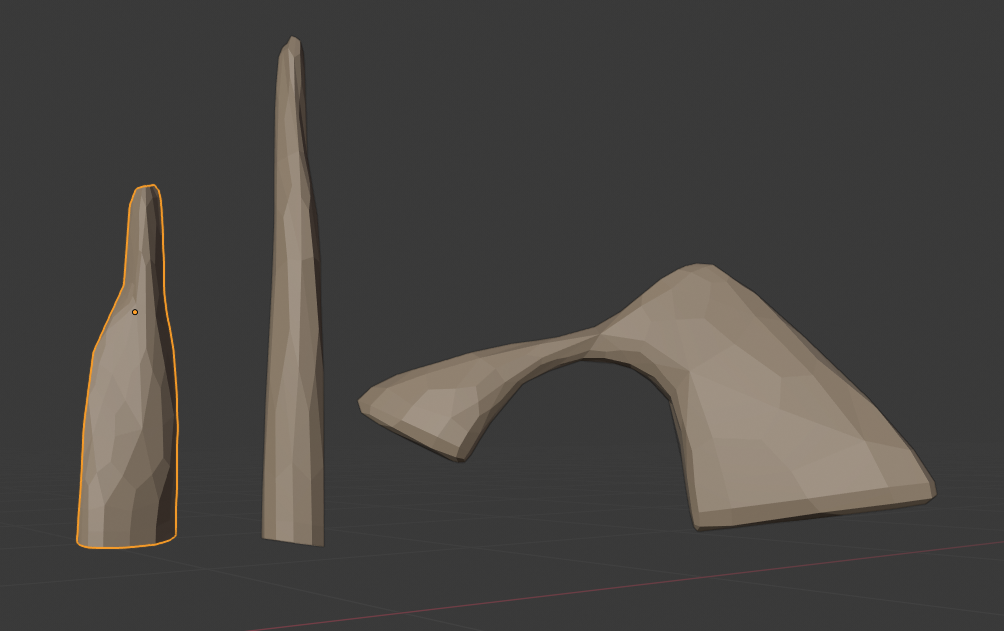
Anyway, here's some screenshots of my progress so far... mostly just modelling stuff, not much done on the scripting side yet, but it's great to see progress.

Crater rocks of Alpha Crater.

Ah, my favourite moth, the cheapest too - the Silver Y.

Another angle of the Silver Y, now with solar panels.

Tuesday, 14 May 2019

{JSON} sucks in kotlin/java

As a dev with web background, I am used to easily running a Json.parse() here and there and instantly I get to use my JSON object.

Recently as a noob App dev though... wow... are people just this incapable of answering Stack Overflow questions or what??

So if, like me, you were unable to parse JSON to an object in Kotlin and went down a rabbit hole for 3 hours, maybe this will help you:

val jsonObj = JSONObject("{\"valu\":\"77\"}")

var myVar: String? = nullif (jsonObj.has("valu")) {
    myVar = jsonObj.get("valu") as String
}

Wednesday, 15 August 2018

Some errors encountered with app dev.

iOS:

Fonts:

Just a note, if you ever add new fonts to a react project, make sure you search the whole project for the old font, there are cache files that contain references to it.

Also delete the contents of the ios/build directory and make sure each font filename is the same as the actual font's name, Eg "hello-world.ttf" cannot have an actual font name of 'hello world'.


React-Native:

The app does not see my code changes:

Either run the following commands or create an alias for them:

This command clears all your watchman roots, repeat until the roots show as empty:
watchman watch-del-all (repeat until roots are cleared '[]')

This will clear npm cache, meaning no pesky npm installs to get it all working again:
npm cache clean --force use that to clear out node cache

alias uncache-react="watchman watch-del-all;watchman watch-del-all;npm cache clean --force"


Build a release from react-native command:

react-native run-android --variant=release


Checking if in DEV mode in the app:

if (__DEV__) {
  do stuff
}

Thursday, 29 June 2017

Ubuntu has bad memory(management)(fix)

I've had a problem since I switched to ubuntu/linux. It just gets slow and freezes like crazy, and I'm not even doing much. In contrast my Windows PC is able to open about 60 tabs in chrome and allow me to play a game while that's running, with no slow-downs.

So I investigated, finally finding a solution on this askubuntu.com post:
askubuntu-link

So here's what we do:
total memory in KB: +-8000000kb (8gb)
total CPU cores: 4 cores
min_free_kbytes = (total memory * 5%) / cores = 100000kb

Set minimum free ram:
sudo sysctl -w vm.min_free_kbytes=100000

Set how much of the disk to cache:
sudo sysctl -w vm.swappiness=5

Now to make it permanent just add the following to you /etc/sysctl.conf file:
vm.swappiness=5
vm.min_free_kbytes=100000


Hope this helps someone!

Thursday, 11 May 2017

Cheap things that will improve your FPV flying the most.

I have learnt a few things in the last few months of flying and I would like to share it with the world. There's no use struggling when others have already made the mistakes for you.

Here goes:

1. Buy good props. (cost: $3)

Or in my case, buy unbreakable 3 blade performance props.
My recommendation is DALProp's CYCLONE Series T5045C.

I am on my second set, only because the first set started looking ugly.
These things just never break, they bend, which means they absorb the shock so your engines won't.
Bent prop? Just bend it back and rip further.

I started off with dual blade props, but seeing all the pros use tri-blades made me want to try it.
I took the plunge and happened to buy the cyclones. They were only $3 a pack, which really isn't bad.
When they arrived I bolted them to my quad and went flying.

What I experienced is stability and a quiet hum of the blades piercing the air. Such a soothing sound.
But that's not all! I got about 15% longer flight time on these babies. 3$ for that kind of improvement is totally worth it!


2. Buy the right FPV lens (about $9)

I remember watching an endless stream of FPV freestyle videos and wondering how the pilots had such confidence about their surroundings, almost a better spacial awareness if you will.
I assumed it's only the GoPros recording the flight that have a wide field of view.
I was wrong!

Following Mr. Steele's advice, I found a similar lens to the one he uses. The GoPro Hero 2 replacement lens.

On the first flight I felt like all my other flights were done while staring through a toilet roll. I could confidently roll, knowing exactly where the ground is. My moves smoothed out and were less jerky as well as crashing becoming a rare event.

Pretty good for a $9 spend!


3. Simulator Cable (price tbc)

I know, I know. You've heard this before and you're getting sick of hearing it.

I can't stress this enough though, especially if you're on a budget build like me.
Simulators have unlimited battery hours, indestructible copters and physics settings to make it harder on yourself while training.

Click here for simulator cable.

Sims I would suggest are:
1. Hotprops - Free, very good for freestyle
2. FPV Freerider - $5, good overall, but controls are a bit iffy.
3.DRL Racing Simulator - Free, nice graphics, iffy settings, can't get a realistic feel from it.


4. Set your PIDs (Free!)

So you were terrible at mathematics in highschool, that doesn't mean you can't set your PIDs.
I'll be putting together an absolute dummies guide to PID tuning. In the meanwhile, check out Joshua Bardwell's videos, he does things proper and takes you through all the steps.

Setting my PIDs has made me feel like I'm the one holding the direct controls of my quad and not the flight controller. When I roll left, it rolls left, when I stop and pitch backwards, it does so. Make your digital-iness disappear in your controls and give yourself more of an analog feel.

Joshua Bardwell's PID vids

Tuesday, 11 April 2017

New ECMA Script 6 ES6 Ternary operators

I struggled to wrap my head around these two new operators, the && and the ||.

So I decided to write a post about them to explain them to myself.

var || 'hi'         will return  'hi' when false
var && 'hi'     will return 'hi' when true


So:
var || 'hi' means:

return 'hi' if var is false
    --or--
var ? var : 'hi'

and:
var && 'hi' means:

return 'hi' when var is true
    --or--
var ? 'hi' : var

Devlog 8: AI and Radar explanation.